

How to take good photos with a phone: tips, tricks, and inspiration
Editor’s note: This post was first published on March 13, 2020, and was most recently updated on November 17, 2025.
***
You don’t need a pro camera to make print-worthy images. You’ve already got a powerful one in your pocket. Whether you’re documenting everyday life, traveling, or diving into a creative project, your phone can capture photos worth printing and sharing.
The trick? Learning how to take good photos with a phone so your shots feel intentional, polished, and full of meaning. With a handful of phone photography tips, you can lift everyday snapshots into frame-worthy moments and start building a collection that’s ready for print.
In this post, we’ll cover practical ways to shoot sharper, better-composed images, share playful phone photography ideas to keep you inspired, and show you how to turn those captures into a finished photo book you can hold, gift, and keep forever.
Our top phone photography tips
Great results start with small habits. With a few smart tweaks to how you see, tap, and frame, your everyday shots start to look intentional and polished.
Think of these phone photography tips as gentle upgrades to what you already do. Small changes will add up to sharper focus, stronger compositions, and stories that feel more alive.
As you practice, you’ll build a cohesive set of images that’s made to live in a photo book, not stay buried in your camera roll.
1. Capture the unscripted
Lean into candid moments. Watch for what happens between poses: the belly laugh, the glance away, the tiny ritual you’d miss if you blinked. Those honest frames carry more emotion and make beautiful anchors in a visual narrative. Try shooting from a little farther back so you can observe without interrupting the moment.
2. Learn the rule of thirds
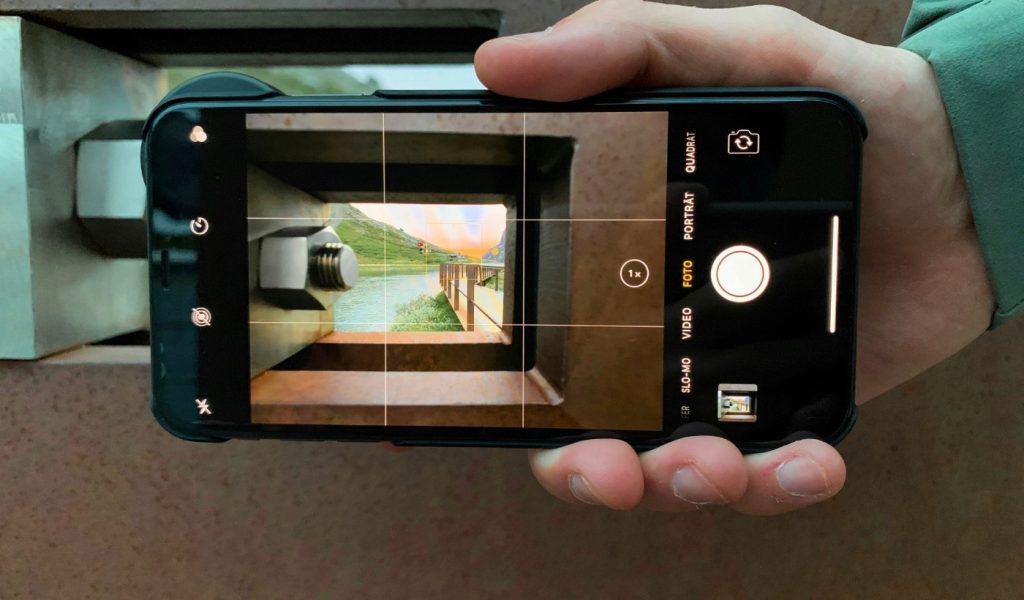
Turn on gridlines in your camera settings and place your subject along a line or intersection. That small shift adds balance and depth—an easy win when you’re learning how to take good photos with a phone. For a quick check, look at the horizon: keep it on a gridline and your scene will feel immediately more composed.
3. Seek out reflections
Puddles, windows, polished car doors, even sunglasses: reflections double your scene and create fresh angles without extra gear. Move around and watch the light, because a few inches can change everything. If the reflection feels too bright, lower your exposure slightly before you shoot to keep details in both halves of the scene.
4. Fine-tune your focus
Tap to set focus where it matters most: eyes in a portrait, a single flower in a field, steam curling off a mug. It instantly makes images feel intentional. After you tap, slide to adjust exposure so your subject stays crisp and the highlights don’t blow out.
5. Embrace the abstract
Break the habit of centered, head-to-toe shots. Crop tight, tilt the frame, or isolate a texture—tiles, fabric, shadows, food. The familiar becomes graphic, surprising, and print-worthy. Look out for repeating shapes and strong contrast to turn everyday scenes into striking, minimalist compositions.
6. Use negative space effectively
What you leave out can be as powerful as what you include. Negative space (think big skies, blank walls, clean tabletops) gives your subject room to breathe and instantly makes a photo feel intentional. Try placing your subject small in the frame against a simple background for a calm, minimalist impact, or surround them with darkness to add tension.
7. Shoot with burst mode
Some moments happen faster than your thumb: kids sprinting, dogs leaping, confetti flying. Switch on burst mode so your phone fires a rapid sequence, then pick the frame with the sharpest focus and best expression. When you’re learning how to take good photos with a phone, burst mode is your safety net for split-second magic.
8. Look for leading lines
Sidewalk edges, stair rails, shorelines, fences—lines are everywhere, quietly guiding the eye. Use them to point toward your subject or to create depth that pulls viewers into the scene. Crouch lower to exaggerate the effect, or angle your phone so the lines converge. A simple change in viewpoint can turn an ordinary path into a strong compositional backbone.
9. Keep a clean lens
Smudges soften contrast, haze colors, and make sharp photos look oddly foggy. Before you shoot, give your phone camera lens a quick wipe with a microfiber cloth (shirt hems can scratch). If you still see flare or haze, shield the lens with your hand to block stray light. Starting clean beats fixing clarity in post every time.
10. Play with patterns
Repeat after us: repetition is your friend. Brick walls, tiled floors, knit sweaters, stacks of chairs, ripples on water—patterns add rhythm and structure that read beautifully on the page. Fill the frame for a graphic, almost abstract look, or break the pattern with a single contrasting subject to create an instant focal point. It’s a quick way to turn everyday scenes into eye-catching images.
Loving these tips? Create a free account to get more ideas and inspiration delivered straight to your inbox.
11. Zero in on details
After you’ve grabbed the wide shot, step closer. Texture, hands, notes on a menu, the way light hits a leaf: these small elements often carry the most story. Isolate one detail and let it fill the frame. You’ll add variety to your set and create images that feel intimate and intentional.
12. Use flash sparingly
Phone flash can be harsh and flat, especially at night. Whenever possible, lean on ambient light from windows, lamps, and streetlights and raise exposure gently instead. If you must use flash, try it in daylight to lift shadows or bounce it off a nearby surface for softer results. A tiny shift in angle can prevent blown highlights and keep skin tones natural.

13. Welcome symmetry
Our eyes love balance. Center a doorway, line up a horizon, mirror a building’s windows—symmetry creates calm, graphic images that print beautifully. For extra impact, stand square to your subject and check the edges of the frame. Clean borders make a perfectly balanced scene sing.
14. Stabilize your shots
Sharp photos start with steady hands. Brace your elbows against your body, rest your phone on a table or railing, or use a small mobile tripod. A two-second timer (or remote shutter) eliminates the last bit of shake, giving you crisper results without extra editing.
15. Shoot using the volume buttons
Treat your phone like a small camera. Use the physical volume buttons (or earbud controls) as a shutter to reduce screen-tap wobble. This is especially helpful for one-handed shooting, overhead angles, or burst mode. It’s one of the simplest phone photography tips that instantly boosts sharpness and control.
16. Experiment with exposure
Light sets the mood, so take control of it. Tap to focus, then slide your phone’s exposure up to reveal shadow detail or down to create moody silhouettes and protect highlights. Try bracketing: Shoot the same scene at two or three brightness levels and pick the version that best tells the story.
17. Harness the golden hour
Head out just after sunrise or before sunset for soft, directional light that flatters everything it touches. Position your subject side-lit for gentle contrast, backlit for glowing edges, or front-lit for warm, even tones. Bring a reflector (a white tote or a notebook will work!) to bounce a little extra light into eyes and shadows.
18. Optimize portrait mode
Portrait mode is more than background blur—it’s subject emphasis. Give it the best chance to shine: choose simple backgrounds, step back a bit, and let your phone reframe as you move. Check edges like hair, hands, and glasses. If the blur looks odd, switch to the regular camera and create separation with distance and light instead.
19. Enhance colors selectively
Use color to guide attention. In your editor, nudge up saturation or vibrance on a single hue (say, the red of a jacket) while easing others for a cleaner palette. Warm up cool scenes for coziness, cool down warm ones for calm—tiny shifts can change the entire feel of an image.
20. Capture the essence of motion
Movement tells its own story, so lean into it. Use slow-mo to stretch a split second—like a hair flip or a splash—into something cinematic. Try time-lapse to compress hours of traffic, drifting clouds, or city lights into a few mesmerizing seconds.
For everyday action, pan with your subject to keep them sharp while the background blurs. Lock focus and exposure (tap and hold) so the phone doesn’t hunt mid-shot, and brace your elbows or prop your phone for extra stability. Small tweaks, big motion magic.
21. Incorporate foreground interest
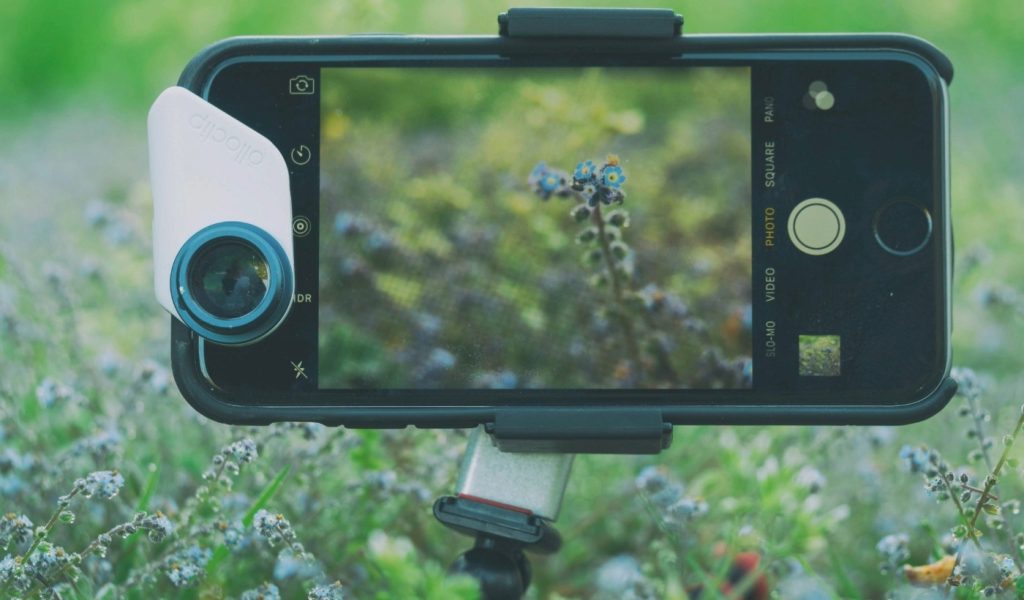
Give your scenes a sense of place by adding something close to the lens, a textured rock, a sprig of wildflowers, a railing, or a doorway. That foreground detail anchors the eye, adds scale, and creates layers that pull viewers from front to back. Move a step left or right to line it up cleanly with your mid-ground and background, and watch the image gain instant depth.
22. Use selective focus for artistic impact
Tap to focus on a single detail, like a raindrop on glass, coffee foam, or the grain of old wood. Then let everything else fall softly out of focus. This isolates the subject, simplifies the frame, and gives your photo a calm, intentional feel. If your phone allows it, lower the simulated f-stop or get physically closer to increase blur and make that key detail sing.
23. Time your shots for natural expressions
Genuine moments beat posed smiles every time. Stay ready, observe the rhythm of the scene, and press the shutter just after the laugh, just before the glance away, or in the pause between words. Use burst mode for micro-expressions and pick the frame where the eyes light up to capture portraits that feel honest and alive.
24. Shoot from different perspectives
Change your point of view to change the story. Get low to make everyday subjects feel epic, or find a balcony or staircase for a graphic top-down look. Tilt, crouch, or step back to include strong shapes and lines. Even a small shift can turn a flat scene into a fresh composition.
25. Mind the horizon line
A crooked horizon can distract from an otherwise beautiful image. Turn on your camera’s level or grid, square the line where sky meets land or water, and keep verticals tidy when you can. If you miss it in the moment, a quick straighten in editing restores balance and gives your landscape that clean, print-ready finish.
26. Use overlays for composition
Gridlines are just the beginning. Many camera apps now offer overlays like the golden ratio spiral or diagonal guides. These tools will help you see balance and flow in new ways. Try placing a subject along a curve or letting strong diagonals cut across your frame. These overlays take the guesswork out of framing and give your phone photos a more intentional, professional polish.
27. Photograph during weather changes
Some of the most dramatic light happens when the weather shifts. Think sunlight breaking through after a storm, mist softening a city street, or dramatic clouds rolling across a landscape. These moments are short-lived but powerful, adding mood and texture that ordinary conditions can’t. Keep your phone ready to capture scenes that feel cinematic and alive.

28. Emphasize scale in landscapes
Want to show just how vast a mountain or canyon feels? Add a person, tree, or other recognizable object into the frame. That tiny figure against a massive backdrop instantly communicates scale, making the viewer feel the grandeur of the scene.
29. Capture contrasts
Opposites attract in photography. Look for contrasts in color, light, or subject matter: old brick next to sleek glass, deep shadows against bright light, or natural textures set against manmade ones. These juxtapositions spark curiosity and tension, helping your photos tell a stronger story.
30. Motion blur for dynamic effect
Not every photo needs to be pin-sharp. A little motion blur can bring energy to your images. Think rushing cars, a spinning carnival ride, or a runner mid-stride. Experiment with slower shutter speeds (or your phone’s built-in motion tools) to let movement paint across the frame. Done right, it turns ordinary action into something dramatic and artistic.
31. Expect to edit
Great photos rarely come straight out of the camera roll. Nudge exposure, lift shadows, add a touch of contrast, and crop for a stronger composition. Editing is where intent meets polish, turning a good capture into the version you meant to make. Keep a light hand so the image still feels true to the moment.
32. Review and learn from your photos
Do a quick post-shoot audit. What worked—light, angle, timing? And what fell flat? Create a favorites album and note why those images sing. This simple habit builds your eye over time and turns casual snaps into thoughtful work.
33. Share and collaborate
Show your work, then listen. Fresh perspectives reveal blind spots and spark new ideas, and collaboration keeps you experimenting with new subjects, styles, and prompts.
Creative phone photography ideas
Now that you know how to take good photos with a phone, it’s time to play. Creativity thrives when you give yourself constraints, so here are some phone photography ideas that double as mini-projects. Each one will sharpen your eye and build a collection you’ll be proud to print.
Seven-day challenge
Need a spark? Give yourself a week to play. This simple, low-pressure sprint gets you looking closer, noticing more, and shooting with intention, using only the camera in your pocket.
Here’s a suggestion:
- Day 1: Textures (wood grain, fabric, stone)
- Day 2: Color (choose one and find it everywhere)
- Day 3: Patterns (architecture, tiles, nature)
- Day 4: Reflections (mirrors, puddles, glass)
- Day 5: Shadows (play with contrast)
- Day 6: Movement (motion blur or freeze action)
- Day 7: Something ordinary, made extraordinary
At the end of the week, you’ll have a tight mini-series with a clear visual voice—perfect for a 20-page starter book. Easy, right?
Portrait project
Skip the studio and capture natural portraits using window light. Friends, family, or pets make perfect subjects. Try experimenting with backlight for dreamy silhouettes or side light for dramatic shadows.
Macro mission
Get up close with your phone. Many newer models have a macro mode, but even without it, you can focus closely on plants, fabrics, food, or everyday objects. The details you’ll uncover are fascinating, and they print beautifully in a photo book.
Urban storytelling
Take a walk through your city with fresh eyes. Capture storefronts, street art, interesting signs, or architectural details. You’ll end up with a visual love letter to your neighborhood—an ideal start for a zine or softcover book.
Light and shadow journal
Spend a day observing how light transforms your space. Photograph the same room in the morning, afternoon, and evening. Notice how shadows shift, colors change, and mood evolves. It’s a poetic project that translates beautifully in print.

From phone captures to photo books
Taking photos on your phone is easy—it’s the part we all do without thinking. The real magic happens when those moments leave the screen and live on the page. A printed photo book transforms quick snaps into something lasting, something you’ll come back to again and again.
Why print your phone photos?
- Memories that last. Phone storage fills up, files get lost, and photos get buried in the scroll. In print, they become part of your story, ready to be pulled off a shelf or handed down.
- Everyday images, elevated. Even the most casual snapshots—your morning walk, a family dinner, a messy birthday cake—take on new meaning when curated into a book.
- Personal gifts, made simple. A book made from your phone photography is thoughtful, one-of-a-kind, and perfect for birthdays, holidays, or just-because surprises.
- A boost for your creativity. Printing changes how you see your work. You’ll notice composition, light, and flow in ways that help you grow as a photographer.
How to get started quickly
The easiest way to move from phone to print is with BookWright Online. You can upload photos directly from your device, drag them into templates, and design your photo book right in your browser—no software downloads required.
Keep it small, keep it doable
A mini project is often the one you’ll actually finish. Just 20 photos are enough to build a slim, polished book—perfect if you’re trying out new phone photography ideas and want to see your favorites in print.
Need a little push?
Our Just Start Challenge walks you through a one-week plan to go from a folder of photos to a finished book. It’s simple, motivating, and designed to get you past the hardest part—starting.
Print the pictures that matter
Learning how to take good photos with a phone isn’t about perfection—it’s about paying attention to light, composition, and story. With a few simple phone photography tips and some creative projects to keep you inspired, you’ll capture moments that feel both personal and artful.
And the best part? Those photos don’t have to live on your screen. Whether you’re making a gift, preserving memories, or building a portfolio, printing your work in a photo book transforms it into something you can return to, again and again.
So grab your phone, try a few of these phone photography tips and ideas, and start building a collection that’s worth holding in your hands. Your photos already tell a story. Printing them is how you make sure that the story lasts.
***
Blurb turns your digital moments into books worth keeping. With intuitive design tools and customizable formats, it’s easy to turn the photos on your phone into something you can hold, share, and treasure. Ready to make it real? Create a free account and get started today.